ERP DESIGN SYSTEM
Scaling clarity and collaboration across +90 team members with a strategic Design System
Year :
2023
Industry :
SaaS – B2B
Client :
Universidad Industrial de Santander
Strategic Challenge
The internal ERP platform at Universidad Industrial de Santander was fragmented. Each team —design, development, QA, and leadership— relied on their own interpretation of how the system should look and behave. There was no single source of truth, no shared design language, and no standard documentation.
This wasn’t just a UI problem — it was a knowledge management failure.
Hypothesis: If we created a Design System grounded in real team workflows and aligned with existing development frameworks, we could reduce errors, speed up design decisions, and ensure long-term scalability.
Goal: Build a scalable Design System that serves as a shared decision-making tool — not just a style guide — across multidisciplinary ERP teams.
Critical Design Decisions
🧩 Decision 1 — Design for internal roles, not just screens
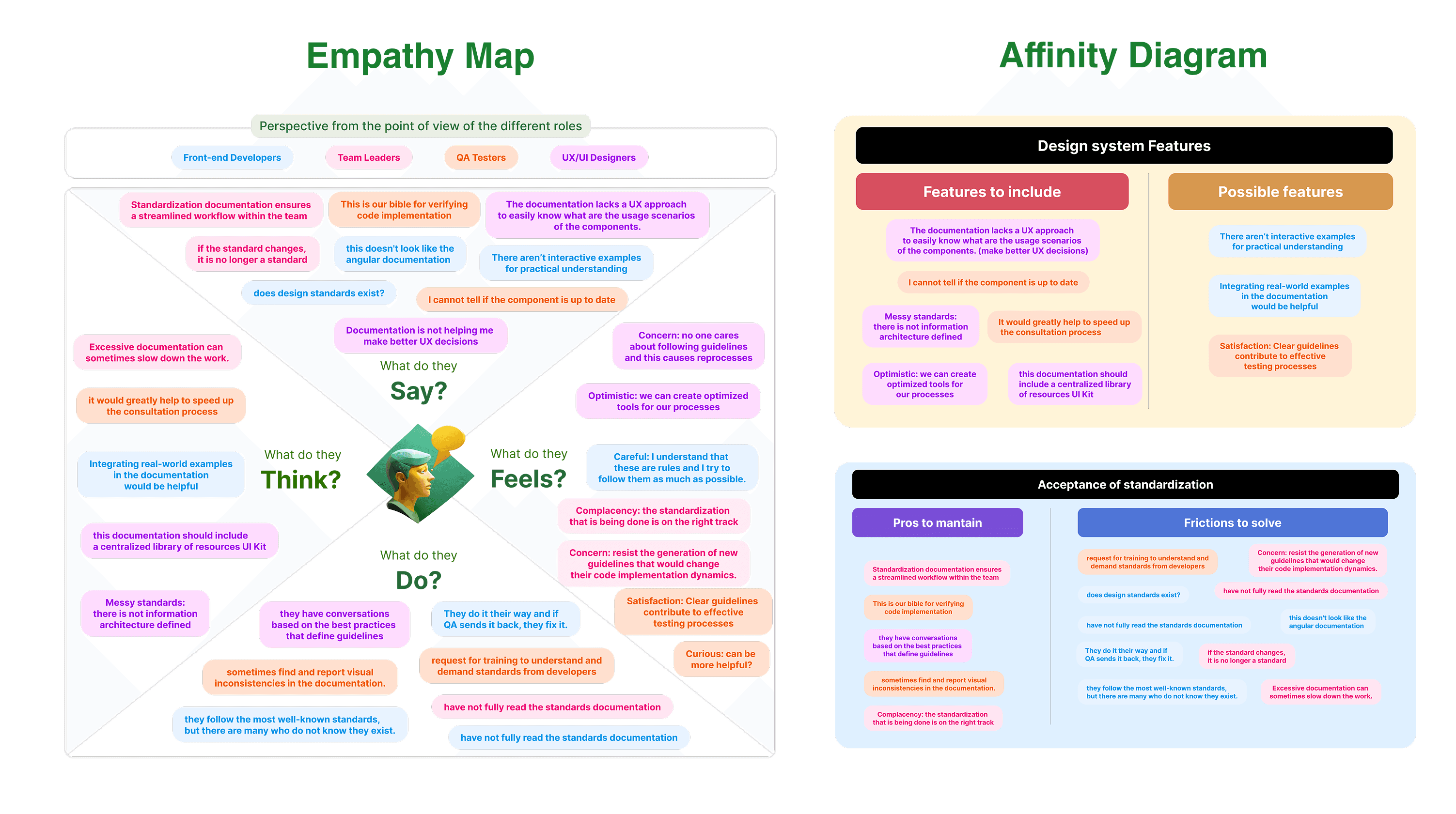
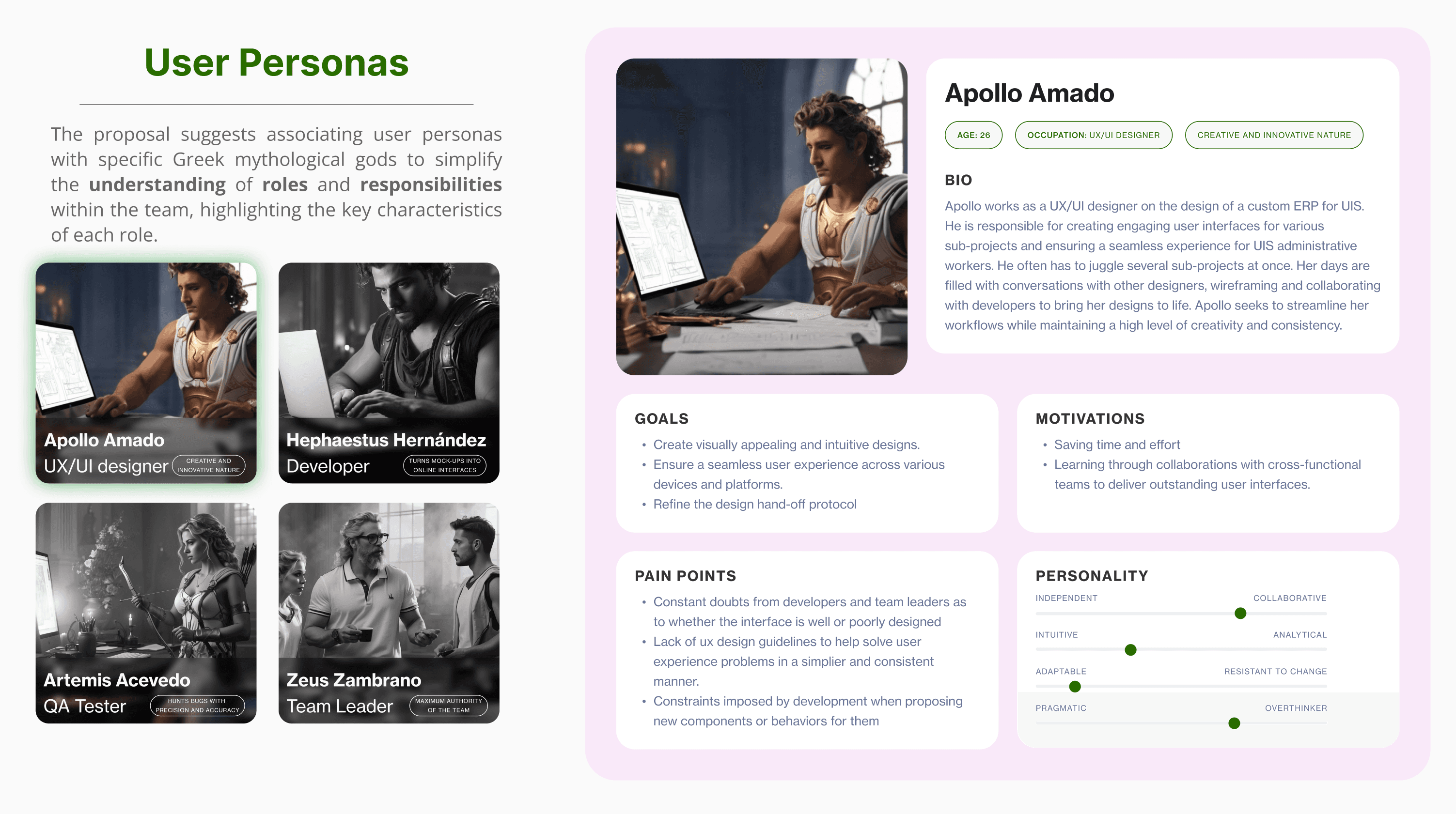
We created internal personas (Designer, Developer, QA, Team Lead) to reflect real pain points across disciplines.
Rationale: Each role had unique frictions that couldn’t be solved with UI alone.
Impact: Documentation became role-aware, improving collaboration and feedback loops.
Outcome: Higher adoption and fewer misinterpretations between teams.
🧭 Decision 2 — Structure from general to specific for faster onboarding
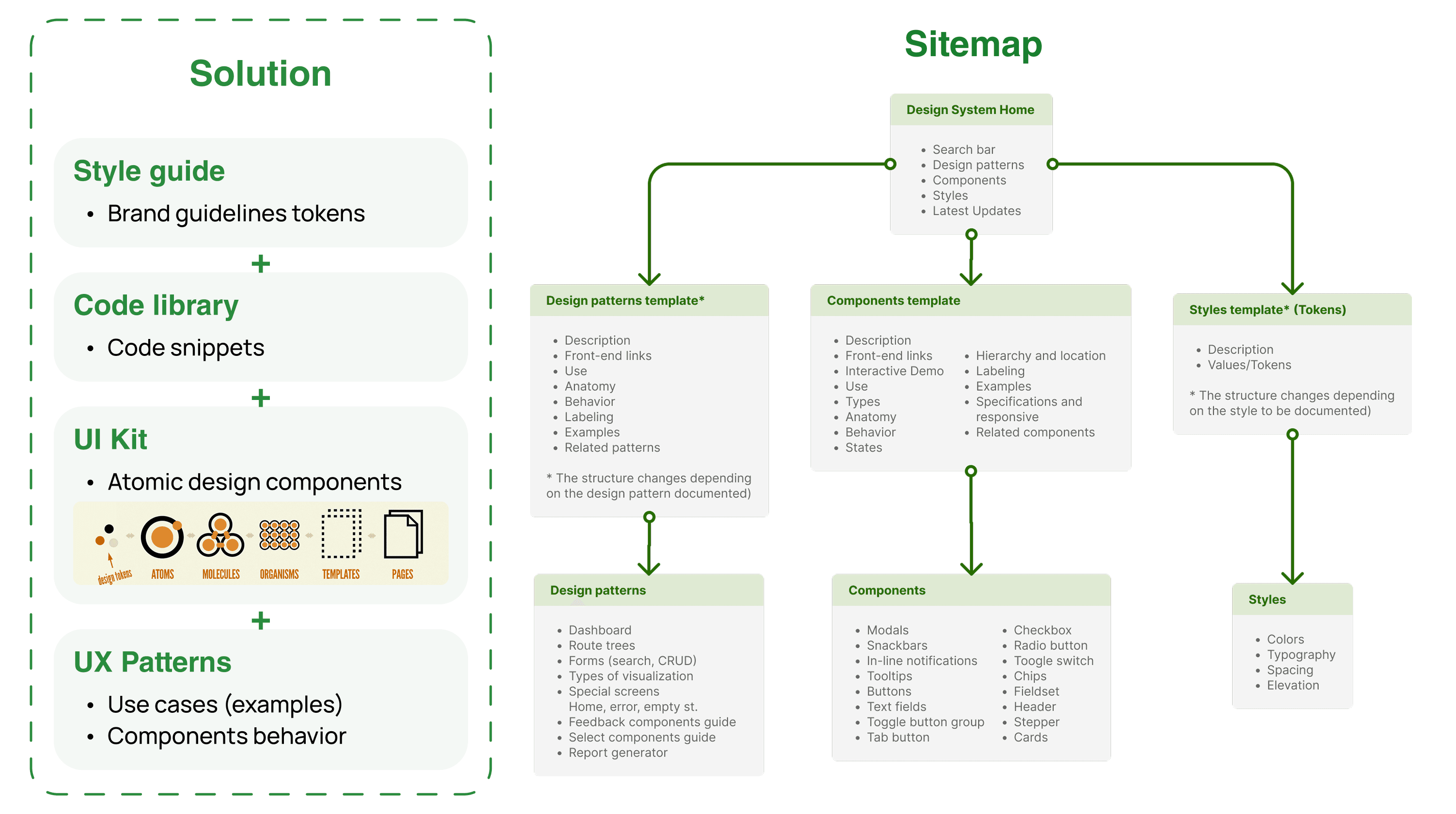
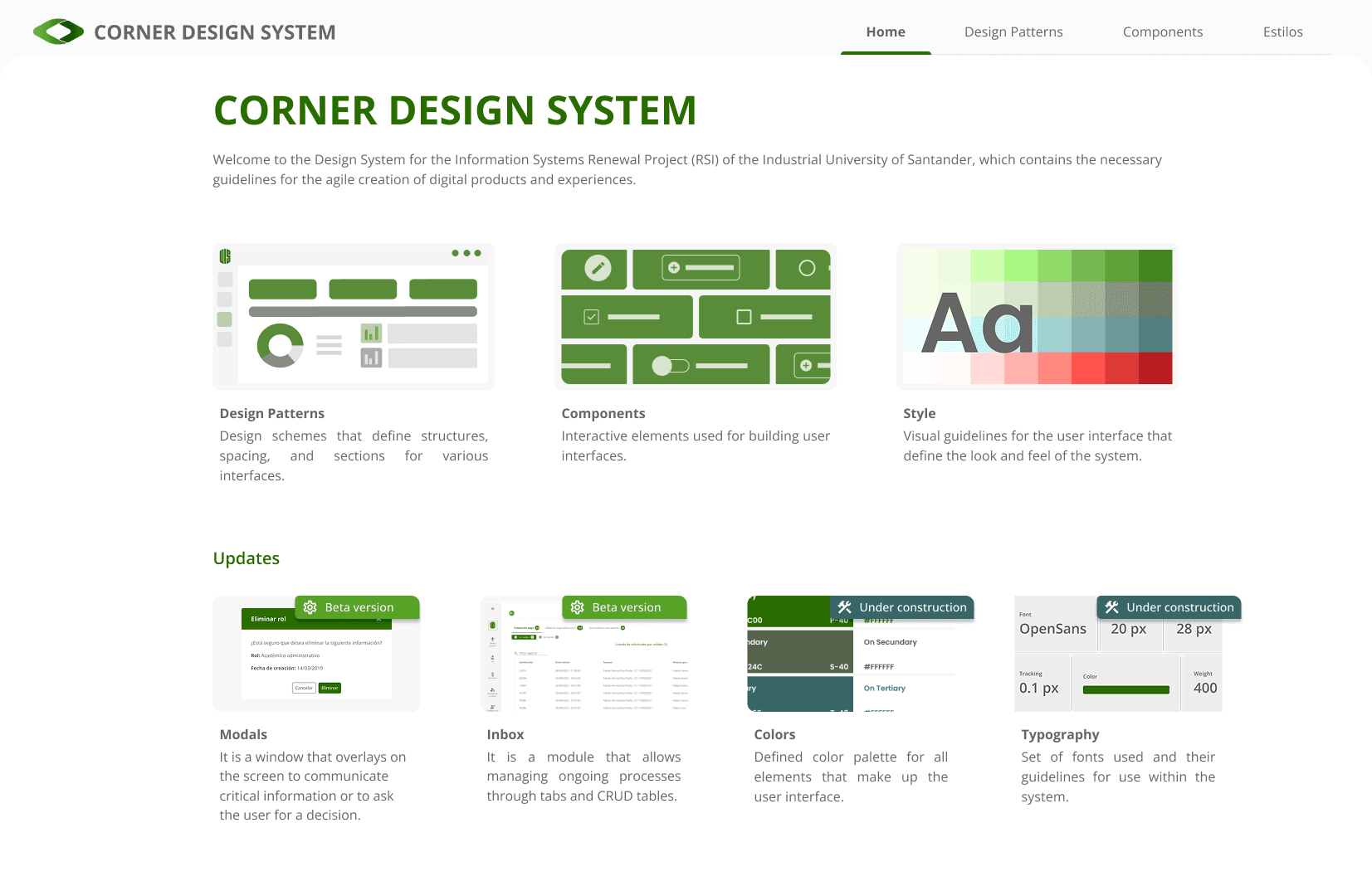
We organized documentation top-down: starting with design patterns (dashboards, forms), then down to atomic components.
Rationale: Helps non-designers understand why and when to use components.
Impact: QA and leads could search and validate UX decisions without confusion.
Outcome: Documentation became a learning tool, not just a UI reference.
⏱️ Decision 3 — Document design rationale to reduce decision fatigue
Each component included a "why": ideal context, use cases, and behavioral logic.
Rationale: Teams wasted time revisiting decisions that were never explained.
Impact: Faster design alignment and fewer redundant reviews.
Outcome: 20% reduction in prototyping and decision time.
📚 Decision 4 — Align documentation architecture with dev stack
We modeled the system after familiar frameworks: Angular Material and Google’s Material Design.
Rationale: Lower resistance by matching developer mental models.
Impact: Integration was smoother and trust in the system increased.
Outcome: Designers and devs spoke the same “language” from day one.
Measurable Results
Area | Observation | Outcome |
|---|---|---|
Design | Centralized UI Kit built with atomic design in Figma | +30% prototyping efficiency |
Design Decision-Making | Clear use cases rationale documented per component/pattern | –20% Ideation and validation time |
Development | Integrated tokens + component library in Storybook (Angular) + GitLab | Faster implementation across ERP modules |
QA | Searchable, segmented documentation by error/use case | –48% recurring visual/UX errors |
Team Alignment | General-to-specific structure, no formal training needed | Higher adoption and system literacy across roles |
Learnings
Robust documentation is design for thinking.
Design systems are only useful if they explain the why, not just the what.
By aligning with existing tools and mental models like Angular Material, GitLab, Storybook, Material Design, we reduced friction and increased trust.
Making life easier for devs, testers, and leads impacts the product’s quality — directly.
“Design systems don’t align pixels. They align brains.”
🔗 Explore the Full Project
🧩 User Personas Link
🚀 Interactive Prototype Flow
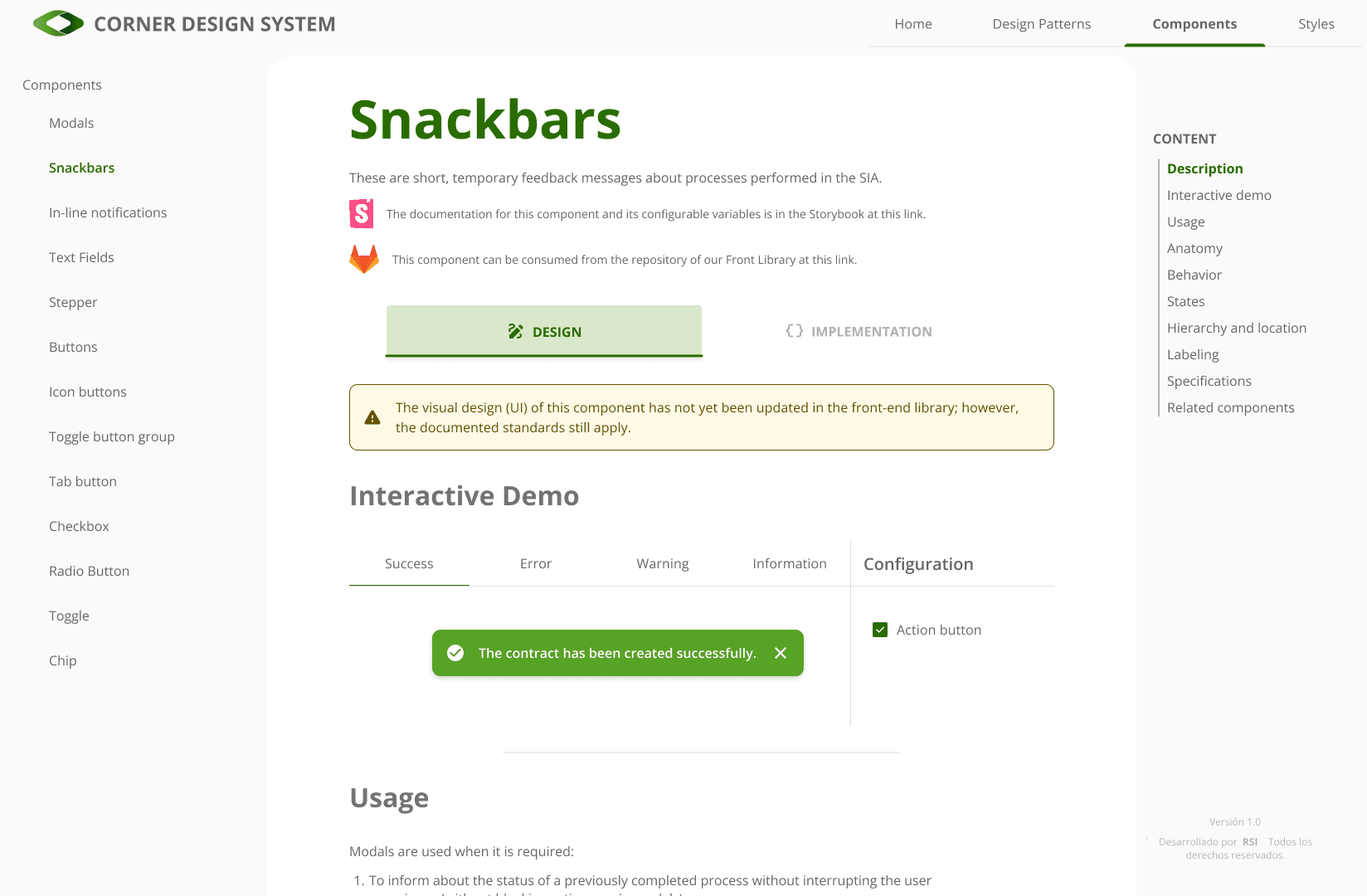
ERP DESIGN SYSTEM
Scaling clarity and collaboration across +90 team members with a strategic Design System
Year :
2023
Industry :
SaaS – B2B
Client :
Universidad Industrial de Santander
Strategic Challenge
The internal ERP platform at Universidad Industrial de Santander was fragmented. Each team —design, development, QA, and leadership— relied on their own interpretation of how the system should look and behave. There was no single source of truth, no shared design language, and no standard documentation.
This wasn’t just a UI problem — it was a knowledge management failure.
Hypothesis: If we created a Design System grounded in real team workflows and aligned with existing development frameworks, we could reduce errors, speed up design decisions, and ensure long-term scalability.
Goal: Build a scalable Design System that serves as a shared decision-making tool — not just a style guide — across multidisciplinary ERP teams.
Critical Design Decisions
🧩 Decision 1 — Design for internal roles, not just screens
We created internal personas (Designer, Developer, QA, Team Lead) to reflect real pain points across disciplines.
Rationale: Each role had unique frictions that couldn’t be solved with UI alone.
Impact: Documentation became role-aware, improving collaboration and feedback loops.
Outcome: Higher adoption and fewer misinterpretations between teams.
🧭 Decision 2 — Structure from general to specific for faster onboarding
We organized documentation top-down: starting with design patterns (dashboards, forms), then down to atomic components.
Rationale: Helps non-designers understand why and when to use components.
Impact: QA and leads could search and validate UX decisions without confusion.
Outcome: Documentation became a learning tool, not just a UI reference.
⏱️ Decision 3 — Document design rationale to reduce decision fatigue
Each component included a "why": ideal context, use cases, and behavioral logic.
Rationale: Teams wasted time revisiting decisions that were never explained.
Impact: Faster design alignment and fewer redundant reviews.
Outcome: 20% reduction in prototyping and decision time.
📚 Decision 4 — Align documentation architecture with dev stack
We modeled the system after familiar frameworks: Angular Material and Google’s Material Design.
Rationale: Lower resistance by matching developer mental models.
Impact: Integration was smoother and trust in the system increased.
Outcome: Designers and devs spoke the same “language” from day one.
Measurable Results
Area | Observation | Outcome |
|---|---|---|
Design | Centralized UI Kit built with atomic design in Figma | +30% prototyping efficiency |
Design Decision-Making | Clear use cases rationale documented per component/pattern | –20% Ideation and validation time |
Development | Integrated tokens + component library in Storybook (Angular) + GitLab | Faster implementation across ERP modules |
QA | Searchable, segmented documentation by error/use case | –48% recurring visual/UX errors |
Team Alignment | General-to-specific structure, no formal training needed | Higher adoption and system literacy across roles |
Learnings
Robust documentation is design for thinking.
Design systems are only useful if they explain the why, not just the what.
By aligning with existing tools and mental models like Angular Material, GitLab, Storybook, Material Design, we reduced friction and increased trust.
Making life easier for devs, testers, and leads impacts the product’s quality — directly.
“Design systems don’t align pixels. They align brains.”
🔗 Explore the Full Project
🧩 User Personas Link
🚀 Interactive Prototype Flow
ERP DESIGN SYSTEM
Scaling clarity and collaboration across +90 team members with a strategic Design System
Year :
2023
Industry :
SaaS – B2B
Client :
Universidad Industrial de Santander
Strategic Challenge
The internal ERP platform at Universidad Industrial de Santander was fragmented. Each team —design, development, QA, and leadership— relied on their own interpretation of how the system should look and behave. There was no single source of truth, no shared design language, and no standard documentation.
This wasn’t just a UI problem — it was a knowledge management failure.
Hypothesis: If we created a Design System grounded in real team workflows and aligned with existing development frameworks, we could reduce errors, speed up design decisions, and ensure long-term scalability.
Goal: Build a scalable Design System that serves as a shared decision-making tool — not just a style guide — across multidisciplinary ERP teams.
Critical Design Decisions
🧩 Decision 1 — Design for internal roles, not just screens
We created internal personas (Designer, Developer, QA, Team Lead) to reflect real pain points across disciplines.
Rationale: Each role had unique frictions that couldn’t be solved with UI alone.
Impact: Documentation became role-aware, improving collaboration and feedback loops.
Outcome: Higher adoption and fewer misinterpretations between teams.
🧭 Decision 2 — Structure from general to specific for faster onboarding
We organized documentation top-down: starting with design patterns (dashboards, forms), then down to atomic components.
Rationale: Helps non-designers understand why and when to use components.
Impact: QA and leads could search and validate UX decisions without confusion.
Outcome: Documentation became a learning tool, not just a UI reference.
⏱️ Decision 3 — Document design rationale to reduce decision fatigue
Each component included a "why": ideal context, use cases, and behavioral logic.
Rationale: Teams wasted time revisiting decisions that were never explained.
Impact: Faster design alignment and fewer redundant reviews.
Outcome: 20% reduction in prototyping and decision time.
📚 Decision 4 — Align documentation architecture with dev stack
We modeled the system after familiar frameworks: Angular Material and Google’s Material Design.
Rationale: Lower resistance by matching developer mental models.
Impact: Integration was smoother and trust in the system increased.
Outcome: Designers and devs spoke the same “language” from day one.
Measurable Results
Area | Observation | Outcome |
|---|---|---|
Design | Centralized UI Kit built with atomic design in Figma | +30% prototyping efficiency |
Design Decision-Making | Clear use cases rationale documented per component/pattern | –20% Ideation and validation time |
Development | Integrated tokens + component library in Storybook (Angular) + GitLab | Faster implementation across ERP modules |
QA | Searchable, segmented documentation by error/use case | –48% recurring visual/UX errors |
Team Alignment | General-to-specific structure, no formal training needed | Higher adoption and system literacy across roles |
Learnings
Robust documentation is design for thinking.
Design systems are only useful if they explain the why, not just the what.
By aligning with existing tools and mental models like Angular Material, GitLab, Storybook, Material Design, we reduced friction and increased trust.
Making life easier for devs, testers, and leads impacts the product’s quality — directly.
“Design systems don’t align pixels. They align brains.”
🔗 Explore the Full Project
🧩 User Personas Link
🚀 Interactive Prototype Flow