Custom university ERP
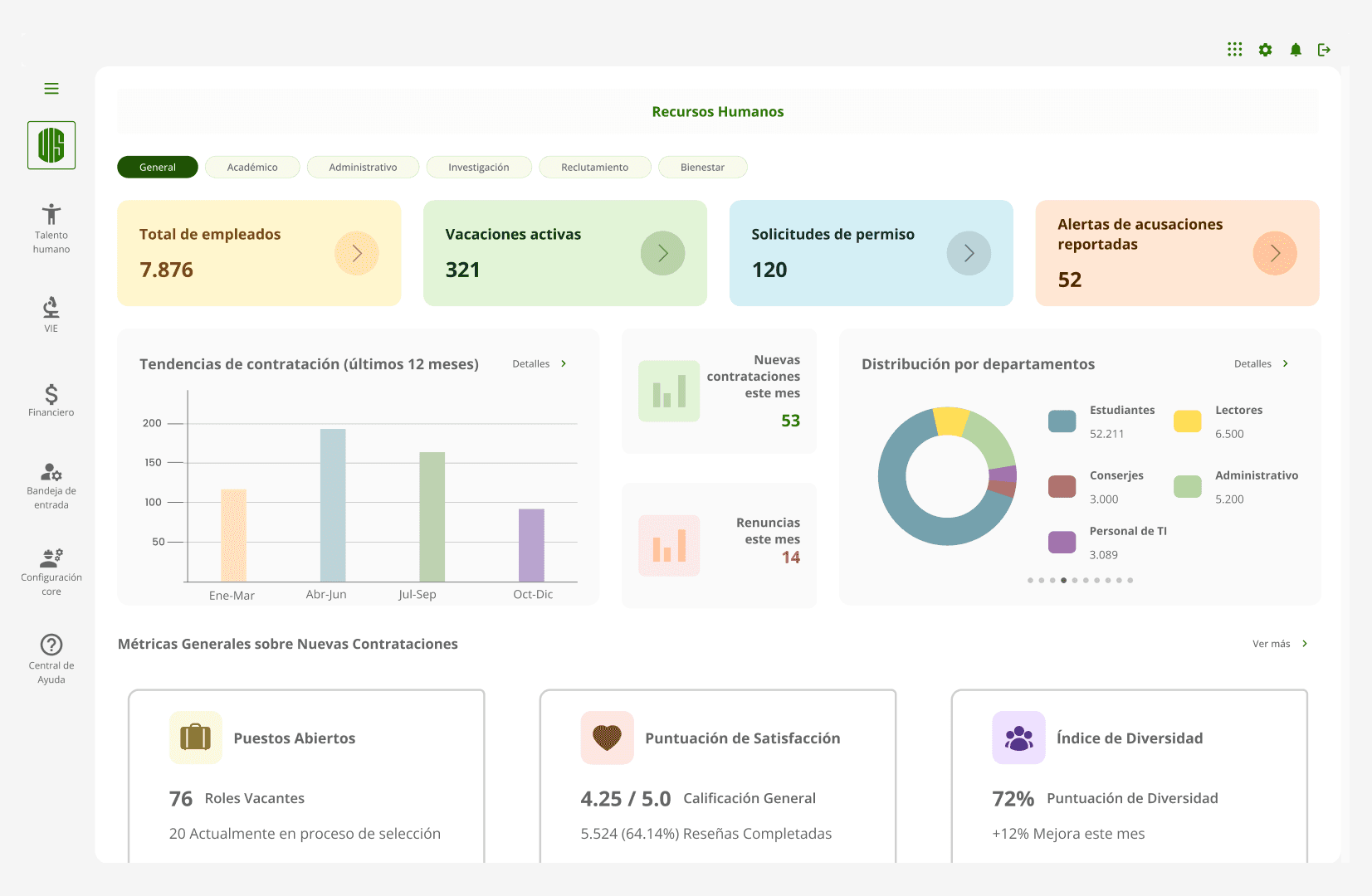
Strategic redesign of a mission-critical university ERP (Enterprise Resourcing Planning Software) used by over 2,000 employees, aimed at replacing legacy infrastructure while improving usability, maintainability, and long-term operational efficiency.
Year :
2023
Industry :
SaaS – B2B
Client :
Universidad Industrial de Santander (UIS)
Strategic Challenge
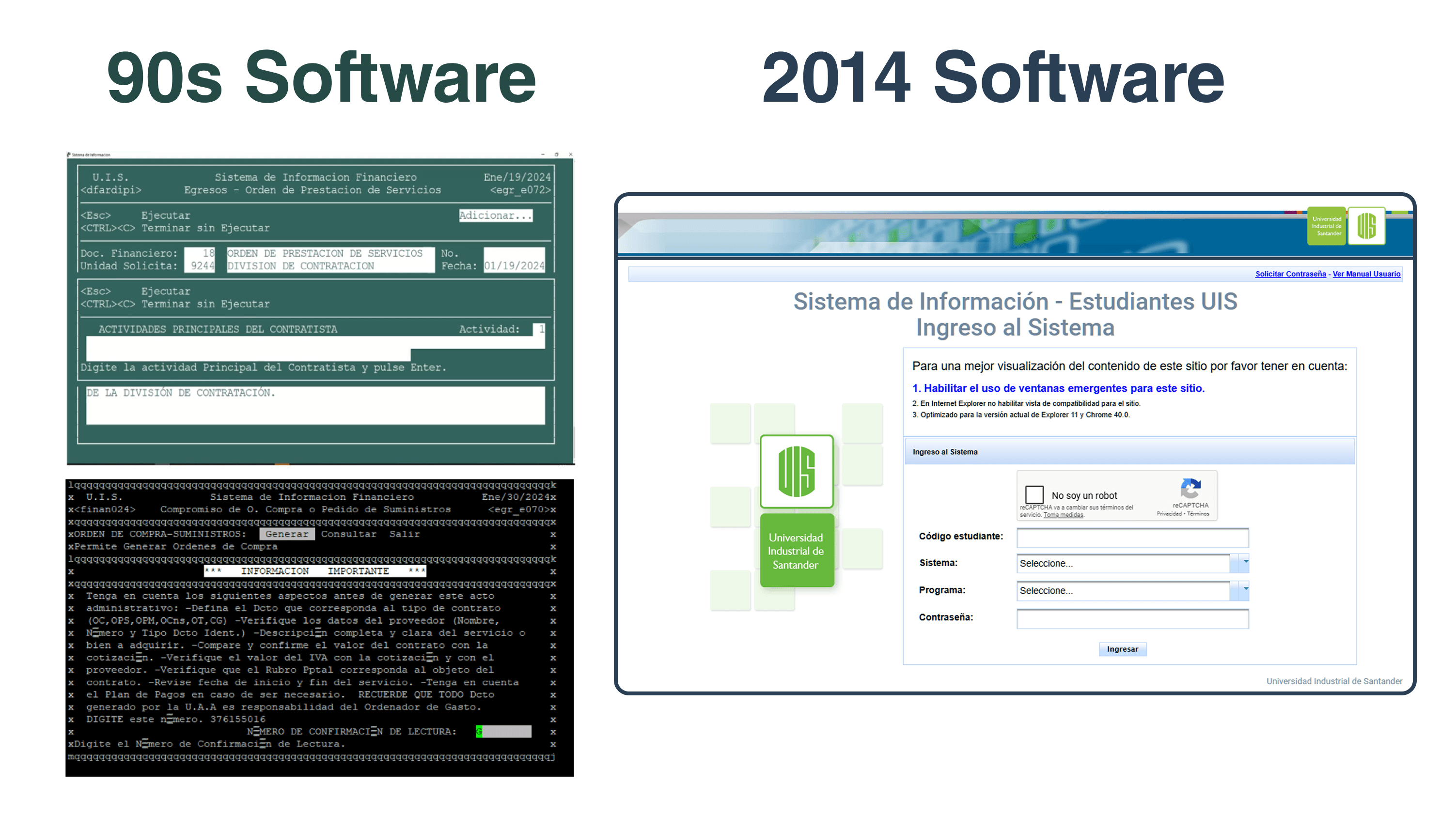
For over two decades, Universidad Industrial de Santander operated its internal financial ERP using a fragmented architecture: a terminal-based interface from 1999 (PuTTY and Informix) and partial modules added in 2014 that never fully replaced the legacy logic.
This hybrid system created technical and human friction. Senior users normalized its complexity, while new hires struggled with an outdated and unintuitive user experience. Replacing the system required more than modern tech—it required reshaping mental models across teams and generations.
Opportunity: Redesigning not only the interface but also the user experience model, with a flexible, scalable architecture supported by a visual and interaction system that served both developers and real users.
Hypothesis: A UX-centered redesign, paired with updated design standards and collaborative design-developer processes, would reduce the learning curve, enable smooth transitions, and increase adoption across diverse user profiles.
Critical Design Decisions
📁 Decision 1 — Deep requirements gathering based on context and real behavior
Previous feature development often ignored actual user workflows, resulting in rigid and misaligned interfaces. I improved stakeholder collaboration using structured frameworks like PACT, DCU, ISO/IEC/IEEE 12207:2017, and Jobs To Be Done. This allowed us to uncover not only functional requirements, but also behavioral and motivational drivers behind core processes.
3x increase in surfaced unmet needs for the "Product Requirements Document".
+40% improvement in task alignment between UX flows mapped and design vs. real workflows.
📋 Decision 2 — Early-stage validation with real users before production
Prior modules were deployed without testing user comprehension, leading to high support demand and internal resistance. I introduced lightweight validation sessions with 2–10 real users per module, focusing on functional clarity and flow comprehension. These were not formal usability tests, but structured walkthroughs to detect friction and confusion early.
Identified critical issues in 25% of sessions before release
Reduced onboarding support by 80%
Improved trust and satisfaction among department stakeholders
💻 Decision 3 — Designing with updated UX/UI standards to ensure usability across age groups
The previous systems were designed for compliance, not comprehension. Their logic reflected 90s enterprise software, not human-centered interaction. I applied updated UX and accessibility standards, prioritizing usability across a broad age range—from early-career staff (20s) to senior administrators (up to 65). We replaced outdated metaphors, removed unnecessary technical language, and prioritized hierarchy, feedback, and interaction predictability.
New users completed key flows independently on their first day
Legacy users adopted the new system with minimal resistance
Reduced reliance on internal training and “system translators”
🧩 Decision 4 — Building a design system compatible with Angular Material Front-end and development constraints
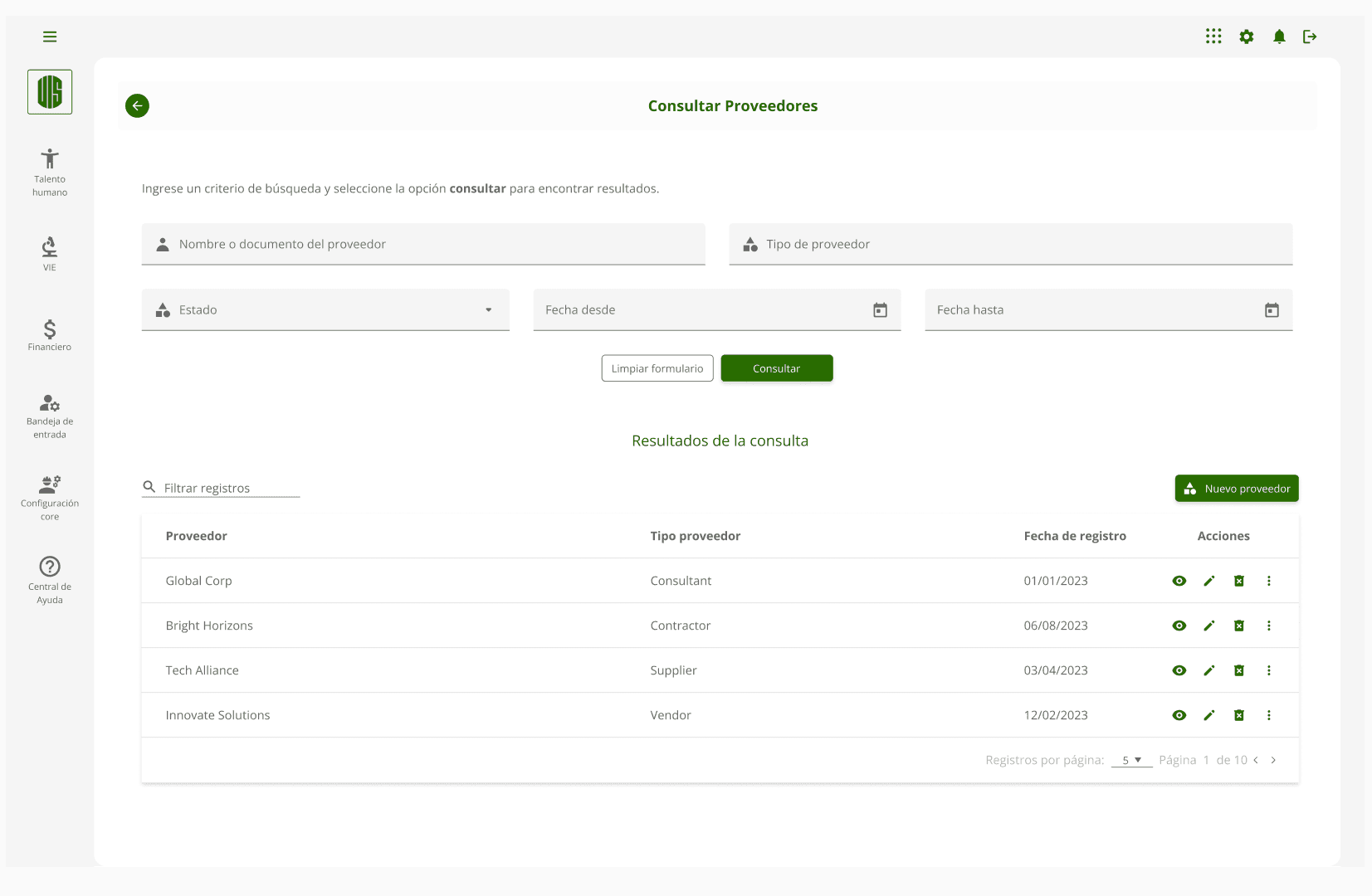
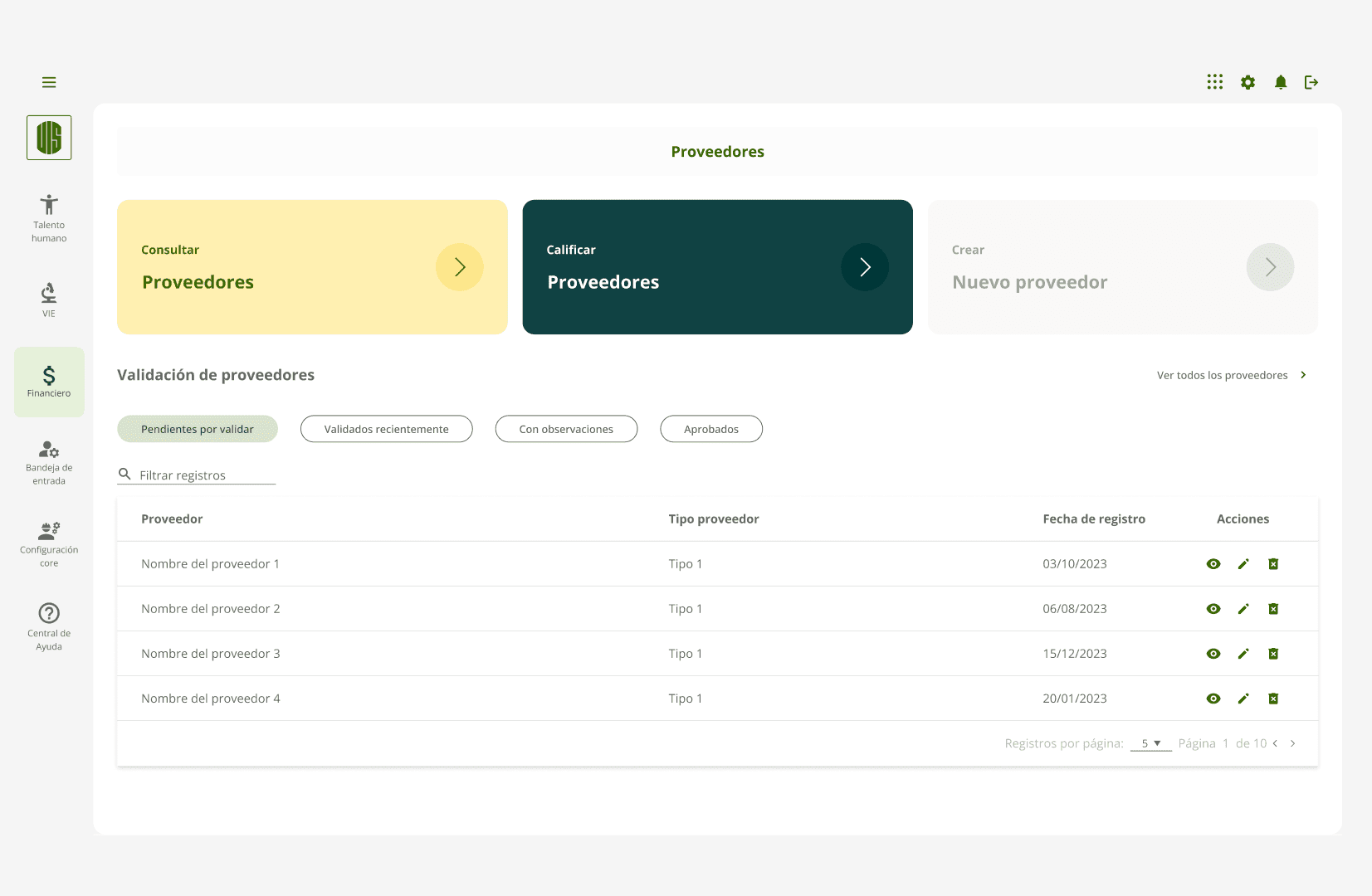
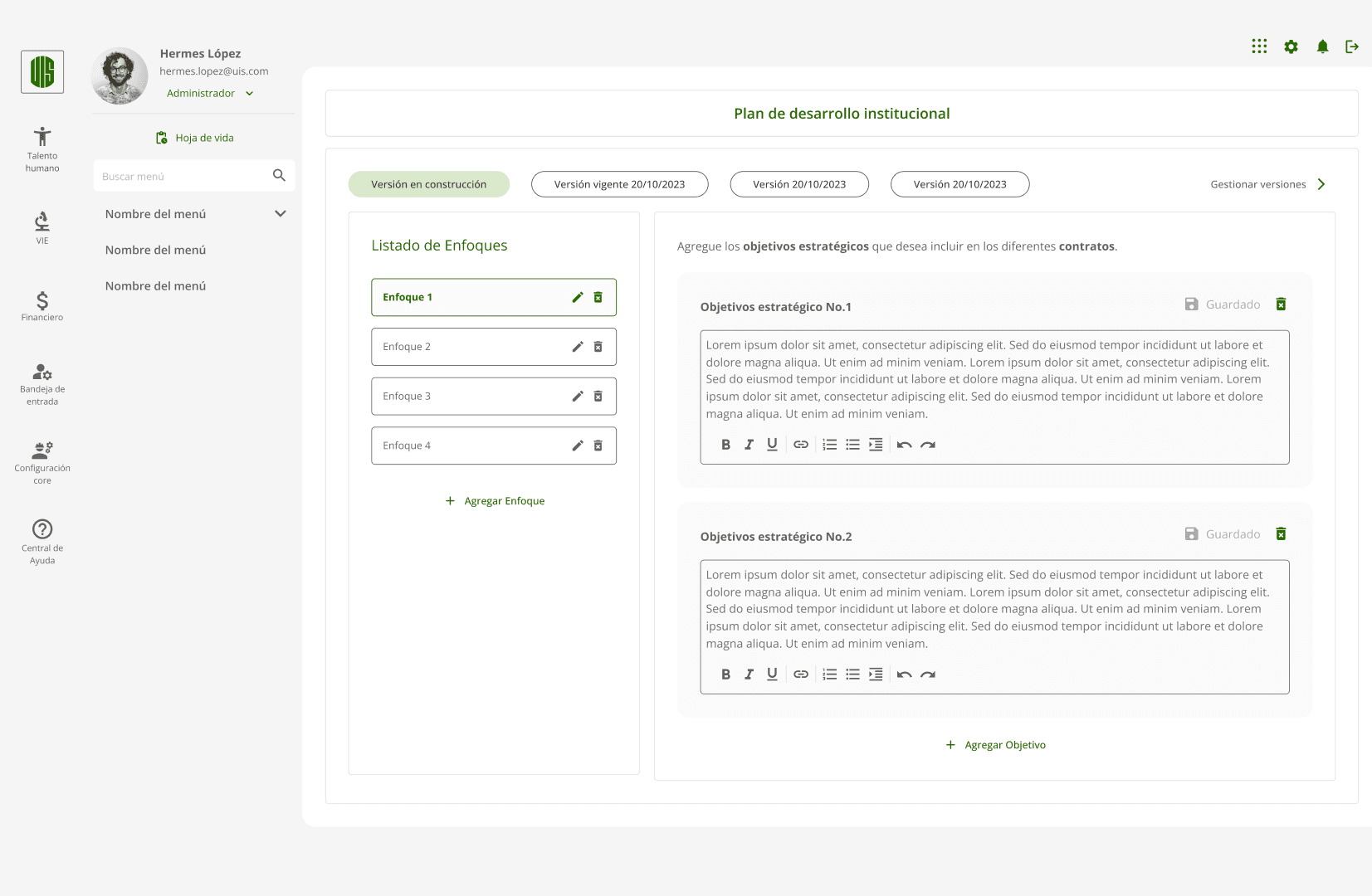
Fragmented design decisions and visual inconsistencies led to rework, developer friction, and scalability issues. I built a design system in Figma, using Atomic Design principles and aligning tightly with Angular Material standards. It was more than a UI kit—it was a shared language between design, development, and QA. Components were documented, accessible, and tested for real use cases.
Accelerated front-end development with fewer ambiguities
20% fewer visual errors during early-stage releases
Created the foundation for scalable, maintainable UI across modules
📊 Measurable Results
Area | Observation | Outcome |
|---|---|---|
Requirements accuracy | Improved alignment of design with actual needs | 80% reduction in design rework |
Learning curve | Onboarding of new users (ages 20–65) | 50% to 90% reduction in time to complete key tasks |
Prototyping efficiency | Faster design delivery due to design system | 30% reduction in design-to-dev cycle time |
Visual consistency | Use of centralized UI Component Library across teams and sub-projects | 30% fewer UI QA issues 2 months after releasing the Design System v1 |
Learnings
Designing for users who normalized dysfunction is harder than starting from scratch. Undoing mental models built on decades of outdated tools required empathy and negotiation—not just design expertise.
Changing the system wasn’t just about tech. It was about trust. Senior users couldn’t imagine that a system could adapt to them—instead of the other way around. Breaking that belief was the real redesign.
“We weren’t modernizing screens. We were shifting how an institution thinks about its own complexity.”
Custom university ERP
Strategic redesign of a mission-critical university ERP (Enterprise Resourcing Planning Software) used by over 2,000 employees, aimed at replacing legacy infrastructure while improving usability, maintainability, and long-term operational efficiency.
Year :
2023
Industry :
SaaS – B2B
Client :
Universidad Industrial de Santander (UIS)
Strategic Challenge
For over two decades, Universidad Industrial de Santander operated its internal financial ERP using a fragmented architecture: a terminal-based interface from 1999 (PuTTY and Informix) and partial modules added in 2014 that never fully replaced the legacy logic.
This hybrid system created technical and human friction. Senior users normalized its complexity, while new hires struggled with an outdated and unintuitive user experience. Replacing the system required more than modern tech—it required reshaping mental models across teams and generations.
Opportunity: Redesigning not only the interface but also the user experience model, with a flexible, scalable architecture supported by a visual and interaction system that served both developers and real users.
Hypothesis: A UX-centered redesign, paired with updated design standards and collaborative design-developer processes, would reduce the learning curve, enable smooth transitions, and increase adoption across diverse user profiles.
Critical Design Decisions
📁 Decision 1 — Deep requirements gathering based on context and real behavior
Previous feature development often ignored actual user workflows, resulting in rigid and misaligned interfaces. I improved stakeholder collaboration using structured frameworks like PACT, DCU, ISO/IEC/IEEE 12207:2017, and Jobs To Be Done. This allowed us to uncover not only functional requirements, but also behavioral and motivational drivers behind core processes.
3x increase in surfaced unmet needs for the "Product Requirements Document".
+40% improvement in task alignment between UX flows mapped and design vs. real workflows.
📋 Decision 2 — Early-stage validation with real users before production
Prior modules were deployed without testing user comprehension, leading to high support demand and internal resistance. I introduced lightweight validation sessions with 2–10 real users per module, focusing on functional clarity and flow comprehension. These were not formal usability tests, but structured walkthroughs to detect friction and confusion early.
Identified critical issues in 25% of sessions before release
Reduced onboarding support by 80%
Improved trust and satisfaction among department stakeholders
💻 Decision 3 — Designing with updated UX/UI standards to ensure usability across age groups
The previous systems were designed for compliance, not comprehension. Their logic reflected 90s enterprise software, not human-centered interaction. I applied updated UX and accessibility standards, prioritizing usability across a broad age range—from early-career staff (20s) to senior administrators (up to 65). We replaced outdated metaphors, removed unnecessary technical language, and prioritized hierarchy, feedback, and interaction predictability.
New users completed key flows independently on their first day
Legacy users adopted the new system with minimal resistance
Reduced reliance on internal training and “system translators”
🧩 Decision 4 — Building a design system compatible with Angular Material Front-end and development constraints
Fragmented design decisions and visual inconsistencies led to rework, developer friction, and scalability issues. I built a design system in Figma, using Atomic Design principles and aligning tightly with Angular Material standards. It was more than a UI kit—it was a shared language between design, development, and QA. Components were documented, accessible, and tested for real use cases.
Accelerated front-end development with fewer ambiguities
20% fewer visual errors during early-stage releases
Created the foundation for scalable, maintainable UI across modules
📊 Measurable Results
Area | Observation | Outcome |
|---|---|---|
Requirements accuracy | Improved alignment of design with actual needs | 80% reduction in design rework |
Learning curve | Onboarding of new users (ages 20–65) | 50% to 90% reduction in time to complete key tasks |
Prototyping efficiency | Faster design delivery due to design system | 30% reduction in design-to-dev cycle time |
Visual consistency | Use of centralized UI Component Library across teams and sub-projects | 30% fewer UI QA issues 2 months after releasing the Design System v1 |
Learnings
Designing for users who normalized dysfunction is harder than starting from scratch. Undoing mental models built on decades of outdated tools required empathy and negotiation—not just design expertise.
Changing the system wasn’t just about tech. It was about trust. Senior users couldn’t imagine that a system could adapt to them—instead of the other way around. Breaking that belief was the real redesign.
“We weren’t modernizing screens. We were shifting how an institution thinks about its own complexity.”
Custom university ERP
Strategic redesign of a mission-critical university ERP (Enterprise Resourcing Planning Software) used by over 2,000 employees, aimed at replacing legacy infrastructure while improving usability, maintainability, and long-term operational efficiency.
Year :
2023
Industry :
SaaS – B2B
Client :
Universidad Industrial de Santander (UIS)
Strategic Challenge
For over two decades, Universidad Industrial de Santander operated its internal financial ERP using a fragmented architecture: a terminal-based interface from 1999 (PuTTY and Informix) and partial modules added in 2014 that never fully replaced the legacy logic.
This hybrid system created technical and human friction. Senior users normalized its complexity, while new hires struggled with an outdated and unintuitive user experience. Replacing the system required more than modern tech—it required reshaping mental models across teams and generations.
Opportunity: Redesigning not only the interface but also the user experience model, with a flexible, scalable architecture supported by a visual and interaction system that served both developers and real users.
Hypothesis: A UX-centered redesign, paired with updated design standards and collaborative design-developer processes, would reduce the learning curve, enable smooth transitions, and increase adoption across diverse user profiles.
Critical Design Decisions
📁 Decision 1 — Deep requirements gathering based on context and real behavior
Previous feature development often ignored actual user workflows, resulting in rigid and misaligned interfaces. I improved stakeholder collaboration using structured frameworks like PACT, DCU, ISO/IEC/IEEE 12207:2017, and Jobs To Be Done. This allowed us to uncover not only functional requirements, but also behavioral and motivational drivers behind core processes.
3x increase in surfaced unmet needs for the "Product Requirements Document".
+40% improvement in task alignment between UX flows mapped and design vs. real workflows.
📋 Decision 2 — Early-stage validation with real users before production
Prior modules were deployed without testing user comprehension, leading to high support demand and internal resistance. I introduced lightweight validation sessions with 2–10 real users per module, focusing on functional clarity and flow comprehension. These were not formal usability tests, but structured walkthroughs to detect friction and confusion early.
Identified critical issues in 25% of sessions before release
Reduced onboarding support by 80%
Improved trust and satisfaction among department stakeholders
💻 Decision 3 — Designing with updated UX/UI standards to ensure usability across age groups
The previous systems were designed for compliance, not comprehension. Their logic reflected 90s enterprise software, not human-centered interaction. I applied updated UX and accessibility standards, prioritizing usability across a broad age range—from early-career staff (20s) to senior administrators (up to 65). We replaced outdated metaphors, removed unnecessary technical language, and prioritized hierarchy, feedback, and interaction predictability.
New users completed key flows independently on their first day
Legacy users adopted the new system with minimal resistance
Reduced reliance on internal training and “system translators”
🧩 Decision 4 — Building a design system compatible with Angular Material Front-end and development constraints
Fragmented design decisions and visual inconsistencies led to rework, developer friction, and scalability issues. I built a design system in Figma, using Atomic Design principles and aligning tightly with Angular Material standards. It was more than a UI kit—it was a shared language between design, development, and QA. Components were documented, accessible, and tested for real use cases.
Accelerated front-end development with fewer ambiguities
20% fewer visual errors during early-stage releases
Created the foundation for scalable, maintainable UI across modules
📊 Measurable Results
Area | Observation | Outcome |
|---|---|---|
Requirements accuracy | Improved alignment of design with actual needs | 80% reduction in design rework |
Learning curve | Onboarding of new users (ages 20–65) | 50% to 90% reduction in time to complete key tasks |
Prototyping efficiency | Faster design delivery due to design system | 30% reduction in design-to-dev cycle time |
Visual consistency | Use of centralized UI Component Library across teams and sub-projects | 30% fewer UI QA issues 2 months after releasing the Design System v1 |
Learnings
Designing for users who normalized dysfunction is harder than starting from scratch. Undoing mental models built on decades of outdated tools required empathy and negotiation—not just design expertise.
Changing the system wasn’t just about tech. It was about trust. Senior users couldn’t imagine that a system could adapt to them—instead of the other way around. Breaking that belief was the real redesign.
“We weren’t modernizing screens. We were shifting how an institution thinks about its own complexity.”